
By Default, we show the following options: 0%, 10%, 15%, 20%, 30%, Other
The "Other" option allows users to enter a custom amount for the tip:
Tip options can be customized in a few different ways, however; we must always offer 5 tip options along with the Other option.
Tip Options
The specific percentages for each option can be altered. For example, we can update the default to 5%, 10%, 15%, 20%, 25%
Tip Option Order
We can adjust the order in which the options appear. For example, we can update the default to
30%, 20%, 15%, 10%, 0%
Default Tip Amount
We can specify a default amount recommended for Tips. For example, by default, we can have the tip options set to automatically recommend 15% at checkout. From here, a user can change their tip amount if they would like to.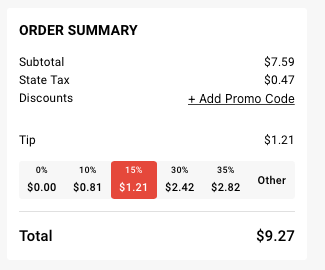
Disabling Tips
We can disable tips altogether, if you do not want customers to tip.
Pickup vs. Delivery
Tip Options, Tip Option Orders, and Default Tip amount can be unique between pickup and delivery. This way, you could recommend, for example, higher tip amounts for delivery vs. pickup.
Additionally, we can disable tips for pickup or delivery, so if you only wanted customers to tip on delivery orders, this is possible.
Please reach out to support@incentivio.com if you would like to adjust your tip options or if you have any additional questions.